decor8ai-sdk
Decor8 AI Python SDK - AI Interior Design & Virtual Staging API



The official Python SDK for Decor8 AI - a powerful AI interior design and AI virtual staging platform. Build AI room design applications, AI home decorations tools, and interior design by AI services with ease.
Features
- AI Virtual Staging - Transform empty rooms into beautifully furnished spaces
- AI Interior Design - Generate designs in 50+ styles for 25+ room types
- AI Landscaping - Create outdoor and garden designs (Beta)
- AI Kitchen Remodeling - Visualize kitchen renovations
- AI Bathroom Remodeling - Preview bathroom transformations
- AI Wall Color Change - Virtually repaint walls with any color
- AI Cabinet Color Change - Preview new cabinet finishes
- AI Sky Replacement - Enhance exterior photos with beautiful skies
- Sketch to 3D Render - Convert sketches into photorealistic renders
- Object Removal - Remove unwanted items from photos
- Image Upscaling - Enhance resolution up to 8x
Table of Contents
- Installation
- Configuration
- Usage
- Design Styles Reference
- Room Types Reference
- Color Schemes
- Seasonal Décor
- Use Cases
Decor8 AI is a cutting-edge AI interior design platform that revolutionizes your design experience. It offers 50+ design styles and 25+ room types to create unique AI room design transformations.
The platform specializes in AI virtual staging, transforming empty spaces into vivid, attractive interiors for real estate marketing and AI home decorations visualization.
The Python SDK enables seamless integration of interior design by AI capabilities directly within your Python environment for data science, ML pipelines, and backend applications.
| See complete API documentation | Contact Decor8 AI Team |
Use Cases
Virtual Staging for Real Estate
- Transform empty properties into beautifully staged homes instantly
- Process multiple properties in batch for large real estate portfolios
- Generate multiple design styles for the same space
- Reduce traditional staging costs by up to 97%
- Perfect for:
- Real estate listings and marketing
- Property websites and portals
- Open house presentations
- Rental property advertisements
- Commercial space visualization
Photography Service Enhancement
- Add virtual staging capabilities to existing photography services
- Differentiate your business with AI-powered staging
- Provide both traditional photos and virtually staged alternatives
- Increase revenue per property with minimal additional effort
- Ideal for:
- Real estate photographers
- Property marketing agencies
- Architectural photographers
- Interior design photographers
- Commercial property photographers
Personal Interior Design Chatbots
- Create AI-powered design assistants using Python’s NLP capabilities
- Integrate Decor8 AI into conversational interfaces
- Provide instant design visualization through chat
- Offer personalized design recommendations
- Perfect for:
- Home improvement platforms
- Design consultation services
- Property management apps
- Real estate platforms
- Interior design applications
Website & App Integration
- Add virtual staging capabilities to any website or application
- Build scalable design generation systems
- Create interactive before/after comparisons
- Enable real-time design visualization
- Integrate with:
- Real estate platforms
- Property management systems
- Interior design applications
- E-commerce furniture sites
- Home improvement portals
Data Science & Enterprise Applications
- Build automated design recommendation systems
- Create ML-powered design analysis tools
- Develop custom design generation pipelines
- Integrate with existing AI/ML workflows
- Ideal for:
- Large-scale property management
- Real estate companies
- Design firms
- Property technology startups
- Marketing agencies
Start transforming spaces today with Decor8 AI’s powerful Python SDK. Whether you’re a developer, business owner, or service provider, our SDK provides the tools you need to bring professional virtual staging and interior design capabilities to your platform.
Installation
You can install the Decor8 AI Python SDK using pip:
pip install decor8ai
Configure Decor8 AI API key
Sign in to Decor8 AI
Click on Profile Photo on Top Left
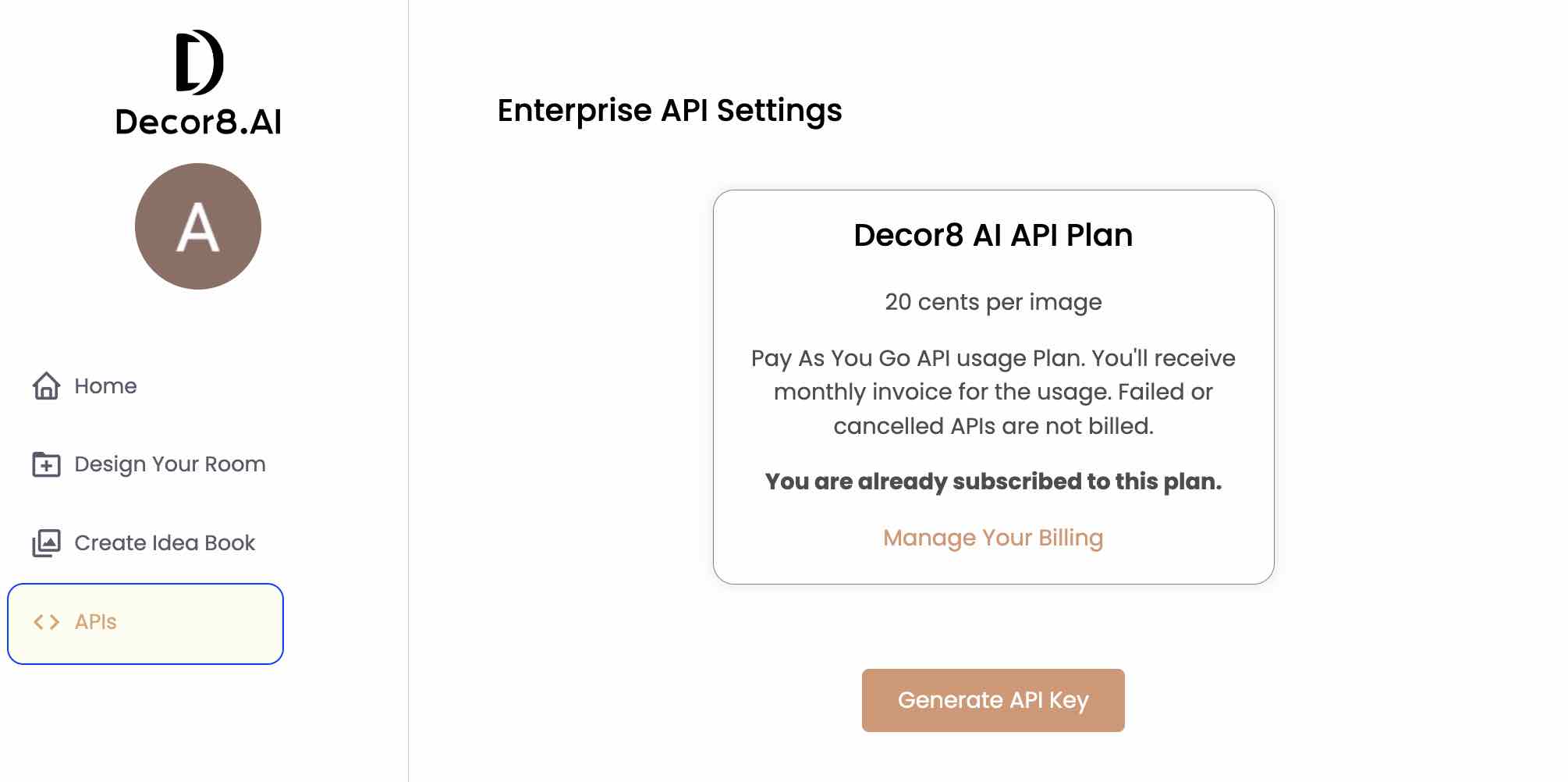
Click Generate API Key
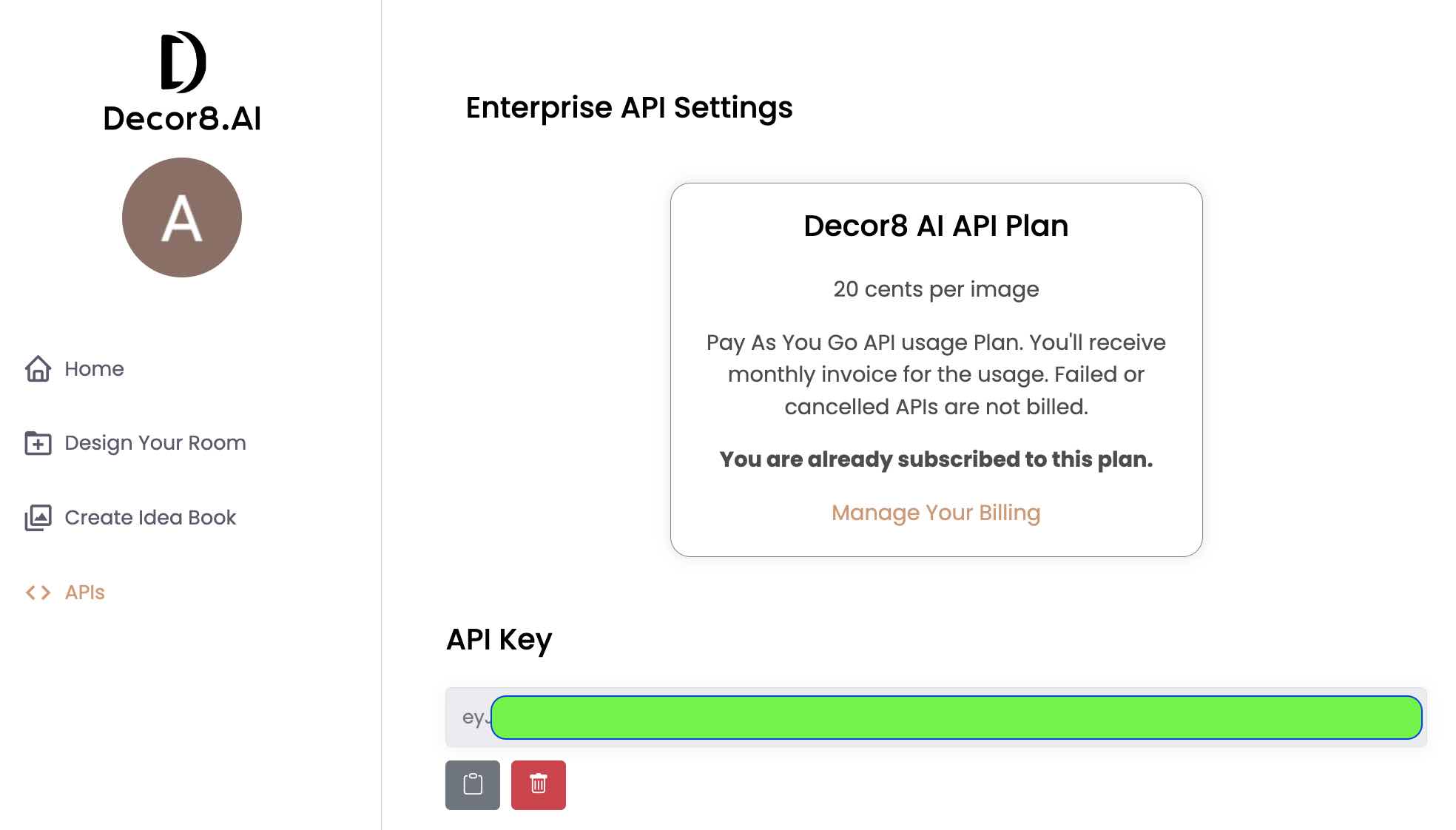
Usage
export DECOR8AI_API_KEY='<YOUR_API_KEY>'
Generating Interior Design with a Photo of the room
Example 1: Using Room Type and Design Style
from decor8ai.client import generate_designs_for_room

# Basic style-guided generation
input_image_url = 'https://prod-files.decor8.ai/test-images/sdk_test_image.png'
room_type = 'LIVINGROOM'  # See below for all supported room types
design_style = 'FRENCHCOUNTRY'  # See below for all supported design styles
num_images = 1  # Up to 4 images can be generated at a time

# Optional style parameters
color_scheme = 'COLOR_SCHEME_5'  # Optional
speciality_decor = 'SPECIALITY_DECOR_5'  # Optional

response_json = generate_designs_for_room(
    input_image_url=input_image_url,
    room_type=room_type,
    design_style=design_style,
    num_images=num_images,
    color_scheme=color_scheme,
    speciality_decor=speciality_decor
)
Example 2: Using Custom Prompt Only
from decor8ai.client import generate_designs_for_room

# Prompt-guided generation
input_image_url = 'https://prod-files.decor8.ai/test-images/sdk_test_image.png'
prompt = "A modern minimalist living space with Scandinavian influences, featuring clean lines, natural materials, and abundant natural light"

response_json = generate_designs_for_room(
    input_image_url=input_image_url,
    prompt=prompt,
    num_images=1
)
Example 3: Using Advanced Generation Controls
from decor8ai.client import generate_designs_for_room

# Advanced generation with style reference image
input_image_url = 'https://prod-files.decor8.ai/test-images/sdk_test_image.png'
prompt = "A cozy reading nook with built-in bookshelves"

# Optional advanced parameters
seed = 42  # For reproducible results
guidance_scale = 15  # Controls prompt adherence (1-20, default: 15)
num_inference_steps = 50  # Number of denoising steps (1-75, default: 50)
design_creativity = 0.5  # Controls creativity level (0-1, default: 0.39)

# Optional: Use a reference image for style guidance
design_style_image_url = 'https://example.com/style-reference.jpg'
design_style_image_strength = 0.8  # How strongly to follow reference (0-1, default: 0.82)

response_json = generate_designs_for_room(
    input_image_url=input_image_url,
    prompt=prompt,
    seed=seed,
    guidance_scale=guidance_scale,
    num_inference_steps=num_inference_steps,
    design_creativity=design_creativity,
    design_style_image_url=design_style_image_url,
    design_style_image_strength=design_style_image_strength,
    num_images=1
)
The response is a JSON object containing the generated designs and other information:
{
    "error": "",
    "message": "Successfully generated designs.",
    "info": {
        "images": [
            {
                "uuid": "81133196-4477-4cdd-834a-89f5482bb9d0",
                "url": "http://<generated-image-path>",
                "width": 768,
                "height": 512
            }
        ]
    }
}
If unsuccessful, the response will contain an error:
{
    "error": "InvalidInput",
    "message": "Invalid input image. Please check the input image and try again.",
}
Advanced Parameters Reference
| Parameter | Type | Default | Description |
|---|---|---|---|
seed |
integer | random | For reproducible results (≥ 0) |
guidance_scale |
integer | 15 | Controls prompt adherence (1-20) |
num_inference_steps |
integer | 50 | Number of denoising steps (1-75) |
design_creativity |
float | 0.39 | Controls creativity level (0-1) |
design_style_image_url |
string | None | Reference image URL for style guidance |
design_style_image_strength |
float | 0.82 | How strongly to follow reference (0-1) |
scale_factor |
integer | 2 | Output resolution multiplier (1-8) |
mask_info |
string | None | Masking information for targeted editing |
webhooks_data |
JSON string | None | Webhook URL for async notifications |
decor_items |
JSON string | None | Specific furniture/accessories to place |
Generating Inspirational Interior Design Ideas without using a photo of the room
from decor8ai.client import generate_designs

# Here, we don't provide input image. The API generates a new interior design using following parameters.
room_type = 'LIVINGROOM' # See below for all supported room types
design_style = 'FRENCHCOUNTRY' # See below for all supported design Styles
num_images = 1 # Up to 4 images can be generated at a time

# Optional Parameters
num_captions = None # Choose 1 or 2 for number of image captions to generate

response_json = generate_designs(room_type=room_type, design_style=design_style, num_images=num_images, num_captions=1)

# If you like HTTP URLs for output, use new API
from decor8ai.client import generate_inspirational_designs
response_json = generate_inspirational_designs(room_type=room_type, design_style=design_style, num_images=num_images)
Priming the walls
If your room contains unfinished walls, unpainted walls or walls which need touch-up, use this API to get walls with basic white colored, smooth textured walls or as it’s called ‘primed walls’.
You can use the returned image as input to generate_designs API for filling it with furniture.
from decor8ai.client import prime_walls_for_room

input_image_url = 'http://example.com/path/to/your/image.png'  #local-file-path or URL or bytes
response_json = prime_walls_for_room(input_image_url=input_image_url)
Upscale the image
AI generated designs may have a smaller resolution for some use-cases. Use this API to get upto 4x the original resolution of the image. Original images of upto maximum 1024px width or height or both are supported.
from decor8ai.client import upscale_image

input_image = 'path/to/your/image.png'  #local-file-path or URL or bytes
scale_factor = 2

response = upscale_image(input_image, scale_factor)
Change Wall Color (NEW)
Change wall paint colors in room images with a simple hex color code.
from decor8ai import change_wall_color

input_image_url = 'https://example.com/room.jpg'
wall_color_hex = '#D4A574'  # Warm beige

response = change_wall_color(input_image_url, wall_color_hex)
Change Kitchen Cabinet Color (NEW)
Recolor kitchen cabinets to visualize different cabinet finishes.
from decor8ai import change_kitchen_cabinets_color

input_image_url = 'https://example.com/kitchen.jpg'
cabinet_color_hex = '#FFFFFF'  # White cabinets

response = change_kitchen_cabinets_color(input_image_url, cabinet_color_hex)
Remodel Kitchen (NEW)
Generate kitchen remodel designs with different design styles.
from decor8ai import remodel_kitchen

input_image_url = 'https://example.com/kitchen.jpg'
design_style = 'MODERN'
num_images = 2
scale_factor = 2  # Optional

response = remodel_kitchen(input_image_url, design_style, num_images, scale_factor)
Remodel Bathroom (NEW)
Generate bathroom remodel designs with different design styles.
from decor8ai import remodel_bathroom

input_image_url = 'https://example.com/bathroom.jpg'
design_style = 'CONTEMPORARY'
num_images = 2

response = remodel_bathroom(input_image_url, design_style, num_images)
Landscaping Designs (NEW - Beta)
Generate landscaping designs for yards and outdoor spaces.
from decor8ai import generate_landscaping_designs

input_image_url = 'https://example.com/yard.jpg'
yard_type = 'FRONT_YARD'  # Options: 'FRONT_YARD', 'BACKYARD', 'SIDE_YARD'
garden_style = 'JAPANESE_ZEN'  # See garden styles below
num_images = 2

response = generate_landscaping_designs(input_image_url, yard_type, garden_style, num_images)
Garden Styles
| Style | Style | Style | |——-|——-|——-| | JAPANESE_ZEN | MEDITERRANEAN | ENGLISH_COTTAGE | | TROPICAL | DESERT | MODERN_MINIMALIST | | FRENCH_FORMAL | COASTAL | WOODLAND | | PRAIRIE | ROCK_GARDEN | WATER_GARDEN |
Replace Sky (NEW)
Replace the sky in exterior property photos with different times of day.
from decor8ai import replace_sky_behind_house

input_image_url = 'https://example.com/house.jpg'
sky_type = 'DUSK'  # Options: 'DAY', 'DUSK', 'NIGHT'

response = replace_sky_behind_house(input_image_url, sky_type)
Sketch to 3D Render (NEW)
Convert sketches or floor plans to photorealistic 3D rendered images.
from decor8ai import sketch_to_3d_render

input_image_url = 'https://example.com/sketch.jpg'
design_style = 'MODERN'
num_images = 2
render_type = 'PERSPECTIVE'  # Options: 'PERSPECTIVE', 'ISOMETRIC'

response = sketch_to_3d_render(input_image_url, design_style, num_images, render_type=render_type)
Remove Objects from Room (NEW)
Remove furniture and objects from room images. Optionally use a mask to specify areas.
from decor8ai import remove_objects_from_room

input_image_url = 'https://example.com/room.jpg'
mask_image_url = 'https://example.com/mask.png'  # Optional

response = remove_objects_from_room(input_image_url, mask_image_url)
Generate captions for the interior image
If you need apt captions for an image depicting a specific interior design style in a room, use this API.
from decor8ai.client import generate_image_captions

room_type = 'LIVINGROOM'
design_style = 'FRENCHCOUNTRY'
num_captions = 2

response = generate_image_captions(room_type, design_style, num_captions)
Sample output

{
    "error": "",
    "message": "Successfully generated image captions.",
    "info":
    {
        "captions":
        [
            "\"Enchanting French Country Charm: Where cozy meets elegance in the heart of the living room.\"",
            "\"Step into a Parisian dream - where charm, elegance, and comfort seamlessly blend in this enchanting French country living room retreat. Get ready to indulge in rustic sophistication and let the cozy embrace of timeless design whisk you away to provincial bliss.\""
        ]
    }
}
Supported Design Styles
Decor8 AI supports following design styles. Learn more about these styles at Decor8 AI Decoration Styles
| Design Styles | |||
|---|---|---|---|
| MINIMALIST | SCANDINAVIAN | INDUSTRIAL | BOHO |
| TRADITIONAL | ARTDECO | MIDCENTURYMODERN | COASTAL |
| TROPICAL | ECLECTIC | CONTEMPORARY | FRENCHCOUNTRY |
| RUSTIC | SHABBYCHIC | VINTAGE | COUNTRY |
| MODERN | ASIAN_ZEN | HOLLYWOODREGENCY | BAUHAUS |
| MEDITERRANEAN | FARMHOUSE | VICTORIAN | GOTHIC |
| MOROCCAN | SOUTHWESTERN | TRANSITIONAL | MAXIMALIST |
| ARABIC | JAPANDI | RETROFUTURISM | ARTNOUVEAU |
| URBANMODERN | WABI_SABI | GRANDMILLENNIAL | COASTALGRANDMOTHER |
| NEWTRADITIONAL | COTTAGECORE | LUXEMODERN | HIGH_TECH |
| ORGANICMODERN | TUSCAN | CABIN | DESERTMODERN |
| GLOBAL | INDUSTRIALCHIC | MODERNFARMHOUSE | EUROPEANCLASSIC |
| NEOTRADITIONAL | WARMMINIMALIST |
Supported Room Types
Decor8 AI supports following room types. Learn more about these room types at Decor8 AI Room Types
| Room Type | |||
|---|---|---|---|
| LIVINGROOM | KITCHEN | DININGROOM | BEDROOM |
| BATHROOM | KIDSROOM | FAMILYROOM | READINGNOOK |
| SUNROOM | WALKINCLOSET | MUDROOM | TOYROOM |
| OFFICE | FOYER | POWDERROOM | LAUNDRYROOM |
| GYM | BASEMENT | GARAGE | BALCONY |
| CAFE | HOMEBAR | STUDY_ROOM | FRONT_PORCH |
| BACK_PORCH | BACK_PATIO | OPENPLAN | BOARDROOM |
| MEETINGROOM | OPENWORKSPACE | PRIVATEOFFICE |
Supported Color Schemes
Decor8 AI supports following color schemes.
| Color Scheme Value | Description |
|---|---|
| COLOR_SCHEME_0 | Default |
| COLOR_SCHEME_1 | Moss Green, Tan, White |
| COLOR_SCHEME_2 | Gray, Sand, Blue |
| COLOR_SCHEME_3 | Hunter Green, Red |
| COLOR_SCHEME_4 | White, Pops of Color |
| COLOR_SCHEME_5 | Blue, Neon |
| COLOR_SCHEME_6 | Light Blue, Emerald |
| COLOR_SCHEME_7 | Blue, Grass Green |
| COLOR_SCHEME_8 | Blue, Beige |
| COLOR_SCHEME_9 | Gray, Brown |
| COLOR_SCHEME_10 | Black, Red |
| COLOR_SCHEME_11 | Gray-Green, White, Black |
| COLOR_SCHEME_12 | Blue, Gray, Taupe |
| COLOR_SCHEME_13 | Black, Navy |
| COLOR_SCHEME_14 | Emerald, Tan |
| COLOR_SCHEME_15 | Forest Green, Light Gray |
| COLOR_SCHEME_16 | Yellow, Gray |
| COLOR_SCHEME_17 | Pink, Green |
| COLOR_SCHEME_18 | Blush Pink, Black |
| COLOR_SCHEME_19 | Black, White |
| COLOR_SCHEME_20 | Blue, White |
Supported Seasonal / Special Décor
Decor8 AI supports following seasonal décor.
| Speciality Decor Value | Description |
|---|---|
| SPECIALITY_DECOR_0 | None |
| SPECIALITY_DECOR_1 | Halloween Decor with Spooky Ambiance, Eerie Elements, Dark Colors, and Festive Accents |
| SPECIALITY_DECOR_2 | Christmas Decor with Christmas Tree, Ornaments, and Lights |
| SPECIALITY_DECOR_3 | Thanksgiving Decor, Fall Season Decor |
| SPECIALITY_DECOR_4 | Fall Season Decor |
| SPECIALITY_DECOR_5 | Spring Season Decor |
| SPECIALITY_DECOR_6 | Summer Season Decor |
| SPECIALITY_DECOR_7 | Winter Season Decor |
Links
- Decor8 AI Platform - Get started with AI interior design
- API Documentation - Complete API reference
- API Playground - Try the API interactively
- GitHub Repository - SDK source code
- PyPI Package - Package registry
- Contact Support - Questions or custom integrations
Keywords: AI Interior Design, AI Virtual Staging, AI Virtual Staging API, AI decorations, AI Home Decorations, AI room design, Interior design by AI, AI home design, Python virtual staging, real estate virtual staging SDK